
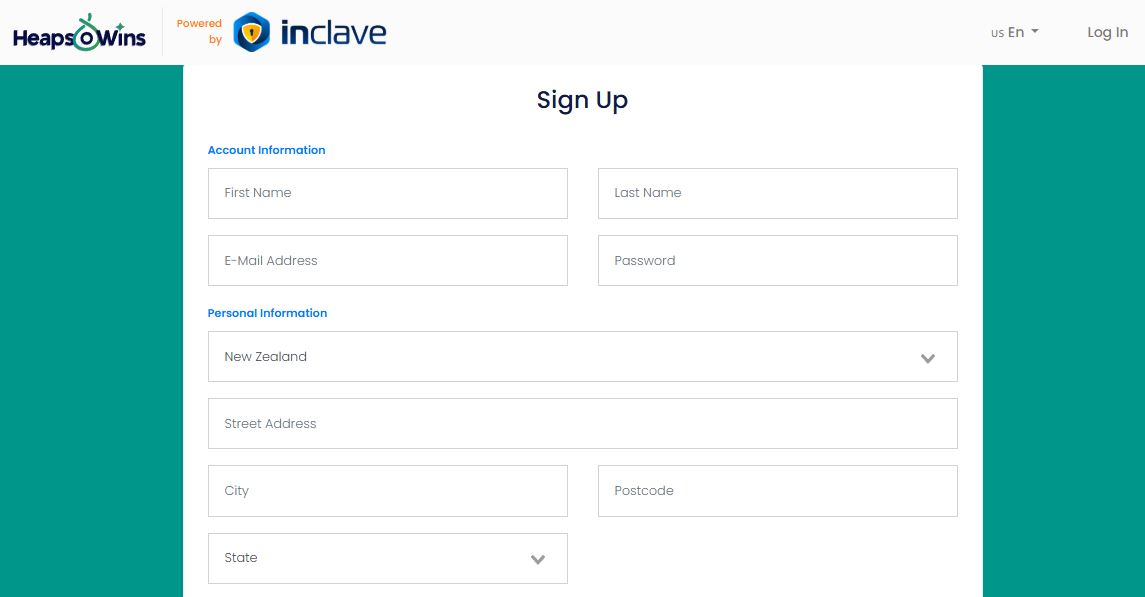
Opening an account at Heaps of Wins Casino takes under three minutes for players in New Zealand in 2026. This page explains the registration steps, required details, and document preparation, plus solutions to common sign-up issues, so you can start playing without unnecessary delays.
|
Registration Detail |
Information |
|
Minimum Age |
18+ (verify local gambling age) |
|
Required Documents |
Government ID, proof of address, payment verification |
|
Registration Methods |
Email, phone, one-click options |
|
Verification Time |
24-48 hours |
|
Account Limit |
One account per person/household |
The casino requires identity verification before your first withdrawal. Complete this process early to avoid cashout delays later.
Email Registration Method
-
Click the "Join" or "Register" button on the casino homepage
-
Enter your email address and create a strong password (8+ characters, mix of letters, numbers, symbols)
-
Fill in personal details: full name (as it appears on your ID), date of birth, physical address
-
Select your currency (cannot be changed later)
-
Enter phone number for account security
-
Accept terms and conditions after reading
-
Click "Create Account" to finalize
Check your inbox for a verification email within five minutes. Click the confirmation link to activate your account. If the email doesn't arrive, check your spam folder before requesting another.
Mobile Registration
The mobile registration process mirrors desktop steps. Access the site through your smartphone browser:
-
Tap the registration button (top-right corner)
-
Form fields auto-adjust to mobile screen size
-
Use autofill features to speed up data entry
-
Camera access may be requested for ID upload during verification
Save your login credentials in your device's password manager to avoid typing errors on future logins.
KYC Verification Requirements

94.91%

96.12%

96.47%

94.15%

95.5%





Account verification confirms your identity and complies with anti-money laundering regulations. Start this process immediately after registration to prevent withdrawal delays.
Document Upload Process
-
Log into your casino account
-
Navigate to "My Account" or "Profile" section
-
Find "Verification" or "KYC Documents" tab
-
Select document type from dropdown menu
-
Upload clear photos or scans (JPG, PNG, PDF formats accepted)
-
Submit for review
The verification team reviews documents within 24-48 hours during business days. You'll receive email confirmation once approved. Resubmit if any document is rejected with specific reasons provided.
Common Document Rejection Reasons
|
Rejection Reason |
How to Fix |
|
Document expired |
Upload current valid ID |
|
Address mismatch |
Ensure address matches registration details exactly |
|
Poor image quality |
Retake photo in good lighting, no blur or glare |
|
Document corners cut off |
Capture entire document with borders visible |
|
Wrong document type |
Check requirements - must be from approved list |
Take photos against a dark background for better contrast. Ensure text is sharp enough to read at 100% zoom.
Common Registration Issues and Solutions
|
Issue |
What It Means |
How to Fix It |
|
Email Already Registered |
An account already exists with this email (previous signup, typo, or accidental use). |
Use “Forgot Password” to regain access. If you can’t access the email, contact support to verify ownership. Multiple accounts are not allowed. |
|
Country or Region Restricted |
Registration blocked due to licensing rules or temporary geo-detection errors. |
Confirm your country is supported by checking the site footer or contacting support. Avoid VPN use unless explicitly permitted in the terms. |
|
Age Verification Failed |
The system can’t confirm you meet the minimum gambling age. |
Check that your birth date matches your ID. Upload a clear photo showing the full date of birth. Contact support instead of creating a new account. |
|
SMS Code Not Received |
Mobile verification message delayed or blocked by the carrier. |
Recheck phone number and country code, wait 2-3 minutes, request resend, ensure signal strength, or ask support for manual verification. |
Account Security Best Practices
Protect your casino account from unauthorized access:
Strong Password Requirements:
-
Minimum 8 characters (12+ recommended)
-
Mix uppercase and lowercase letters
-
Include numbers and special symbols
-
Avoid personal information (birthdays, names)
-
Never reuse passwords from other sites
Enable Two-Factor Authentication (2FA): Many casinos offer optional 2FA through authenticator apps (Google Authenticator, Authy). This adds a second verification step at login - even if someone steals your password, they cannot access your account without your phone.
Login Troubleshooting
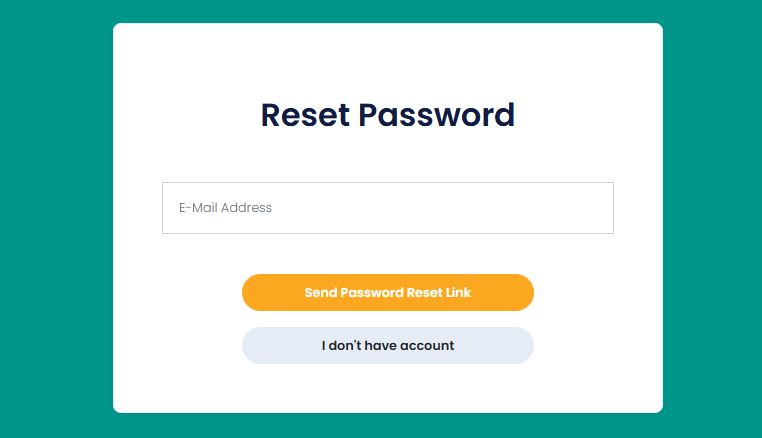
Wrong Password Recovery
Click "Forgot Password" on the login screen. Enter your registered email address. Password reset link arrives within 5 minutes (check spam folder). Create a new password following strength requirements. Reset links expire after 24 hours - request another if needed.
If you cannot access your registered email:
-
Contact support with account details (username, registration date, last deposit amount)
-
Provide ID verification to prove account ownership
-
Support will guide you through manual password reset or email change
Account Locked or Suspended
Accounts lock automatically after multiple failed login attempts (3-5 tries). This security feature prevents brute-force hacking. Wait 30 minutes, then try again with correct credentials.
If your account shows "Suspended" or "Disabled":
-
Incomplete KYC verification - submit required documents
-
Suspected terms violation - review terms of service, contact support
-
Self-exclusion activated - contact responsible gambling team if set in error
-
Payment chargeback detected - resolve with billing department
Never create a second account while your first is locked. Contact support to resolve the issue.
Geo-Block or Access Denied Messages
"Access denied from your location" appears when:
-
Your IP address shows a restricted country
-
Mobile carrier routes through blocked region
-
VPN or proxy detected (if prohibited)
Solutions:
-
Disable VPN if casino prohibits virtual locations
-
Clear browser cache and cookies
-
Try different browser or device
-
Contact support to whitelist your IP if you're in an allowed jurisdiction
-
Use official mirror sites if provided by the casino for your region
Verification Timeline and Priority Processing
Standard KYC verification completes within 24-48 hours during weekdays. Expect delays during weekends or holidays when verification teams operate reduced hours.
Factors affecting verification speed:
-
Document quality (clear photos process faster)
-
Time of submission (weekday mornings get faster review)
-
Account activity (first deposit often triggers priority review)
-
Complexity of documents (foreign IDs may require checks)
You can make deposits before verification completes. Withdrawals remain locked until KYC approval finishes. Plan ahead - submit documents when you register, not when you're ready to cash out.
Support Contact Methods
Reach the help desk for registration assistance through:
-
Live chat (fastest response, 24/7)
-
Email support (expect 12-24 hour reply time)
-
FAQ section (self-service for common issues)
Responsible Gambling Resources
Heaps of Wins Casino and all licensed operators provide tools to control your gambling:
Self-Limit Options:
-
Deposit limits (daily, weekly, monthly)
-
Loss limits to cap total losses
-
Session time reminders
-
Cooling-off periods (24 hours to 6 weeks)
-
Self-exclusion (6 months to permanent)
Set limits in your account settings before you start playing. Limit increases have 24-72 hour waiting periods. Decreases take effect immediately.
Frequently Asked Questions
Can I register if I'm under 18?
No. Online gambling is restricted to adults 18 years or older (21+ in some jurisdictions). Casinos verify age through ID documents. Underage gambling attempts result in account closure and winnings forfeiture. Parents should use parental controls to block gambling sites from devices used by minors.
How long does account verification take?
24-48 hours during business days. Submit clear, complete documents immediately after registration to avoid delays. Priority processing may be available for VIP accounts. You can deposit before verification completes, but withdrawals require approved KYC status.
What if my ID has a different address than my current residence?
Your proof of address document must show your current physical residence. If your ID shows an old address, that's acceptable - casinos verify current residence through utility bills or bank statements. Ensure the name on all documents matches your registration details exactly.
Can I change my registered email address later?
Yes, through account settings or support requests. You'll need to verify the new email address. For security, Heaps of Wins may require ID verification before changing primary email. You cannot transfer your account to another person - this violates terms and results in account closure.
Is a VPN allowed for registration and playing?
VPN policies vary by casino. Some permit VPN for privacy protection, others prohibit it to enforce geographic restrictions. Check the terms of service or contact support before using VPN. Playing through VPN when prohibited risks voided winnings and account closure, even if you're in an allowed jurisdiction.
What happens if I forget my username?
Contact support with your registered email address or phone number. They'll retrieve your username after verifying account ownership through security questions or ID check. Save login credentials in a password manager to prevent this issue.
Can household members each have an account?
Yes, multiple people at the same address can register separate accounts. Contact support to note multiple players at one residence. Each person must use their own email, payment methods, and personal details. Sharing accounts or bonuses between household members violates terms and results in closure of all accounts.
Rating
★
★
★
★
★
0.0
Votes: 0
